

Description
Download ZIP Unzip Tool – Chrome Apps, zip, unzip, extract, file, tool, utility
Overview
The ZIP Unzip Tool is a lightweight desktop application designed to simplify file compression and extraction tasks. Built for users who frequently work with ZIP archives, this tool enables seamless compression and decompression of files without requiring complex workflows. It supports both standard ZIP file operations and advanced file preview capabilities, making it ideal for professionals and everyday users alike. The software is particularly useful for individuals managing large volumes of documents, media files, or software packages that need to be archived or shared.
One of the key benefits of this tool is its focus on privacy and security. By operating entirely offline and using HTML5 technology, it ensures that files are processed locally without being uploaded to any servers. This makes it a reliable choice for handling sensitive or confidential data. The tool also allows users to access ZIP files directly from their local drives or Google Drive, offering flexibility in file sourcing. Real-world usage scenarios include preparing project folders for transfer, extracting software installers, or reviewing embedded media and documents within archives without saving them to disk.
Key Features & Capabilities
- ZIP Compression and Extraction – Easily compress files into ZIP format or extract contents from existing archives, similar to traditional tools like WinZip.
- Local Processing – All file operations occur on the user’s device, ensuring no data is uploaded, stored, or shared with external servers.
- File Preview Support – View the contents of ZIP files directly within the app without extraction, supporting formats such as PNG, GIF, JPG, BMP, MP3, OGG, WAV, M4A, MP4, WEBM, OGV, PDF, FLV, SWF, TXT, and HTML.
- Google Drive Integration – Access ZIP files stored in Google Drive directly from the application, streamlining workflows for cloud-based users.
- No Registration Required – Use the tool immediately without creating an account or providing personal information.
These features enhance productivity by reducing the need for multiple tools. For example, a graphic designer can quickly preview images inside a ZIP folder before deciding to extract them. Similarly, a project manager can compress a set of documents into a single ZIP file for secure sharing. The integration with Google Drive allows remote teams to work efficiently without relying on third-party services.
User Interface, Workflow & Performance
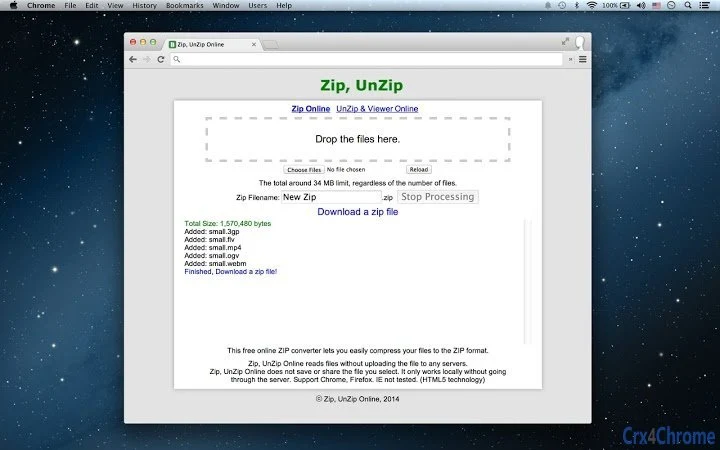
The user interface of the ZIP Unzip Tool is designed with simplicity and efficiency in mind. It features a clean, minimal layout that prioritizes core functions—selecting a ZIP file, viewing its contents, and extracting or previewing files. Navigation is intuitive, with clear buttons for common actions such as “Open ZIP,” “Extract All,” and “Preview.” The app’s workflow is streamlined, allowing users to perform tasks in just a few clicks.
Based on general software behavior patterns, the tool appears optimized for fast operation, especially given its 15 MB size and use of HTML5 technology. The developer did not specify resource usage details, so performance may vary depending on system configuration. However, the local processing model suggests low latency and efficient memory handling. Stability is expected to be high, as the tool avoids server dependencies and complex background processes. Users can expect consistent behavior across different file sizes and archive types.
Compatibility & System Requirements
The ZIP Unzip Tool is compatible with Windows, Mac, and Linux operating systems, making it accessible to a broad user base. It is available in version 1.0 and has a file size of 15 MB, indicating a lightweight installation. The developer did not provide additional system requirements, so users should ensure their system meets basic desktop application standards.
Exact system requirements were not listed. Compatibility information was partially provided. The tool leverages HTML5 technology, which is supported across modern browsers and operating systems, suggesting broad compatibility. Users should verify that their OS version supports HTML5-based applications. No hardware-specific demands were mentioned, but the small file size implies minimal storage and processing needs.
Pros and Cons
Pros
- Completely local processing with no file uploads or server dependencies
- Supports file preview for a wide range of formats including PDF, images, and videos
- Direct access to ZIP files from Google Drive
- No registration or account creation required
- Lightweight design at only 15 MB in size
Cons
- No official information on supported file size limits
- Exact performance metrics and system requirements were not specified
- Limited to ZIP format; no support for RAR, 7Z, or other archive types
- Only available as a desktop application; no mobile version
FAQ Section
Is the ZIP Unzip Tool safe to use?
Yes, the tool is designed with privacy in mind. All file operations occur locally on your device, and no files are uploaded to servers or shared with third parties.
Can I use this tool offline?
Yes, the ZIP Unzip Tool works entirely offline. It does not require an internet connection to compress, extract, or preview files.
Does the app support other archive formats besides ZIP?
Based on available information, the tool is focused on ZIP files only. There is no support for RAR, 7Z, or similar formats.
How do I access files stored in Google Drive?
You can select a ZIP file from your Google Drive directly within the app, provided your system has access to your Google account and the file is accessible.
Is there a free version available?
Yes, the ZIP Unzip Tool is available for free with no limitations on features or usage.
Final Thoughts + CTA
The ZIP Unzip Tool stands out as a secure, lightweight, and user-friendly solution for managing ZIP files. Its emphasis on local processing and privacy makes it a trustworthy choice for users who value data security. With support for file previews and integration with Google Drive, it enhances productivity without sacrificing simplicity. While it lacks support for other archive formats and detailed system specifications, its core functionality is reliable and efficient.
Whether you're a student organizing project files, a professional sharing documents, or a creative handling media assets, this tool offers a straightforward way to manage ZIP archives. Its no-registration, offline-first approach aligns well with modern privacy-conscious workflows.
Download ZIP Unzip Tool now
Guides & Tutorials for Zip, UnZip App App for Chrome
How to install Zip, UnZip App App for Chrome
- Click the Preview / Download button above.
- Once redirected, accept the terms and click Install.
- Wait for the Zip, UnZip App App for Chrome download to finish on your device.
How to use Zip, UnZip App App for Chrome
This software is primarily used for its core features described above. Open the app after installation to explore its capabilities.
User Reviews for Zip, UnZip App App for Chrome 0
No reviews found





